


Chaîne de blocs Binance (BNB)

Introduction
PROM Marketplace aims to make web3 gaming accessible and enjoyable for everyone.
PROM is a game-focused P2P NFT marketplace. Now players can buy NFTs for several web3 games. However, it is only the beginning, and the list of games will be regularly expanded.
Meanwhile, PROM will create its own Games Catalog with detailed information for gamers and investors.
PROM aims to make web3 gaming experiences smooth, comfortable, and financially gainful. To reach this goal, they are developing a multifunctional rental and mortgage platform that works in a completely collateral-free way, guarantees safety, and is easy to use.
Players who want to enter the world of P2E may dismiss their wish because it requires initial investments in pricey assets. Current borrowing models may be dangerous or unprofitable. However, the development team are going to fix this issue by offering safe borrowing opportunities without any 3d parties involved. Based on the Safe Vault technology, PROM Rental will make the borrowing process transparent, simple, and secure both for lenders and borrowers.
What are Gaming NFTs And Why Is It Worth Buying Some?
NFT (Non-Fungible Token) is a contract that is stored on a blockchain and represents its holder's ownership of a digital or physical asset, for instance, a piece of art or a ticket.
An NFT is initially created (minted) on a blockchain and holds unique data that can't be overwritten. Thus, anyone can trace the ownership of a particular asset. Any unauthorized copies are easily exposed.
Gaming NFTs can provide access to game apps and tournaments, or be directly used in gaming scenarios. By owning gaming NFTs, users literally own a part of a game.
Since owning a particular NFT is often the only way to start playing a particular game, NFTs for trending games can quickly rise in price.
Meanwhile, to profit from gaming NFTs, one doesn't need to be a gamer: you can explore collectibles, and check tendencies and stats.
What You Need To Start A NFT Collection
NFTs are stored in crypto wallets with unique addresses recorded on a blockchain. Thus, to pay for NFT and store it, you need one.
If you are a beginner, we recommend you to use MetaMask as a mobile app or a desktop browser extension. Download it from official sources for:
Next, launch it and create a new cryptocurrency wallet. The process is intuitive, but, to prevent potential hacks, they recommend you to:
1) Store your private key and Secret Recovery Phrase physically. For instance, as a handwritten note in a book, Never use digital mediums such as screenshots or photos.
2) Keep your private key or Secret Recovery Phrase secret. Don't share it with anyone. In particular, PROM or any PROM representatives will never ask to disclose this information even for troubleshooting.
Apart from the private key, you'll receive the public key, that can be shared to receive money. Your public key is displayed on the main screen of your MetaMask wallet and can be copied in a click:

Congrats! Once you have a wallet, you may own an NFT.
How To Buy NFTs
To acquire an NFT, you need to connect your wallet to Prom. For this, click the "Connect wallet" button in the right corner of the page:
To explore games currently available at PROM, visit the Marketplace:

To make the most of your search, you can use such game filters as a genre, compatible device, F2P, and others.
To see all NFTs, switch to "NFTs":

To narrow your search and find more details on exact assets, click on the cards in the search results.
Click "Buy Now" and confirm the transactions. If the NFT you need is not related to the network of your wallet, switch to the required wallet network.
Before buying an NFT, check whether you have enough funds in your wallet. Remember that you need to pay gas fees. Gas fees for Polygon or Binance Smart Chain are not huge. Meanwhile, the ones for Ethereum are significantly higher.
How To Sell NFTs
To sell an NFT, you need to list it at PROM Marketplace, set the price, and wait for a buyer. The total amount is automatically transferred to your wallet after a buyer confirms the purchase.
Connect your wallet to see gaming NFTs you own and choose ones to list for sale. Next, click on your address in the top right corner of a page and select "Owned NFTs":

In the "Owned NFTs" section, you will see the NFTs in your wallet. Only the supported games assets will be displayed.
Select an NFT you want to sell and click "List for sale".
Set the price and choose the currency.
Confirm listing. Remember that this process requires gas fees. Meanwhile, PROM doesn't charge any listing commissions.
After listing an NFT for sale, you can change its price or delist it any time you want.
How To Borrow NFTs
1. Choose a game
Visit Marketplace to see games which have their NFTs listed on Prom for sale or rental.

Use filters to make the most of your search: choose by favourite genre, compatible device, look for free-to-play titles, and so on:

On a game's page, you can find useful information. Switch to "FAQ" tab to get answers like "What one needs to start playing this game":

When you've chosen a game, check out:
which NFTs are required to start playing (e.g. one Hero);
which chain a game is based on.
2. Create a SafeVault
You need to create a SafeVault – this is a special decentralised wallet which is needed to temporarily store someone's NFTs, when you are borrowing them.
Click the "Connect wallet" button in the right corner of the page:

After connecting your wallet, click on its address in the upper right corner of the page and choose "Vaults". In this section you can create and manage SafeVaults.

You need a separate SafeVault for each chain. Each SafeVault is created on a certain chain (e.g. Ethereum, Polygon, BSC, etc.) and only NFTs belonging to this very chain can be stored in the vault. They recommend creating a separate SafeVault for a game.
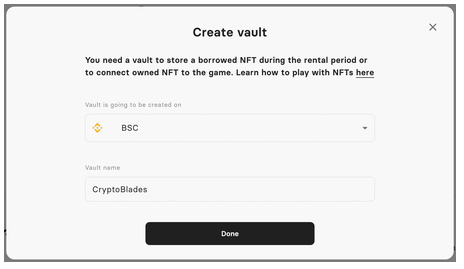
Mind that vault creation implies a small gas fee, as vault is blockchain-based.
3. Choose and borrow an NFT
Return to the game's page and switch to NFTs tab. Choose"Rental" listing type:

You will see NFTs available for rental for a desired game. To narrow your search on exact parameters, use filters on the left side.
In the search results you can see available rent duration (any duration can be chosen within the stated gap) and the price per hour or per day:

When you've decided which NFTs to borrow, double check out the chains these NFTs are on. Before you can proceed to borrowing, you must have SafeVaults on these chains.
Click on the chosen NFT to open the page with detailed information about an asset:

Click "Borrow" to see and confirm rental parameters. You are going to pay rental price with gas fee related to this transaction, at the moment you approve rental:

Confirm all transactions in your Metamask or another wallet. In case of successful transaction you will see a message:

That's it! You don't have to do something to return an NFT, an owner will claim it back.
Be sure you've ended gaming and claimed earned tokens before your rental expires. Otherwise, you risk losing access to what you've earned.
How To Play With Borrowed NFTs
To play with borrowed NFTs, you must connect to a game with the vault containing these NFTs instead of your normal wallet.
Let's see how to do it by the example. For instance, below is described the CryptoBlades journey.
1. Go to cryptoblades.io, click “Enter Game”, choose network (e.g. “Play on BNB”), and connect via your Metamask or another "normal wallet".

2. Click menu button at the top right corner of the page and choose “Settings"

3. Find “Wallet Connect” in the end of the settings list, choose BNB network, and click “Connect”

You will see the code, copy it to clipboard.
4. Now open the vault (containing a borrowed NFT you want to play with) and click “Connect to game”:
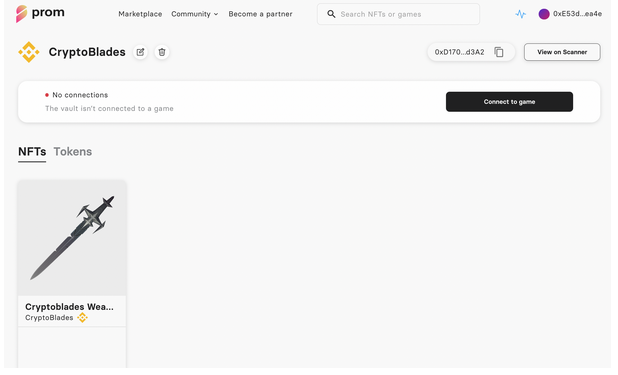
Paste the copied code and click “Next”:

5. That's it! When your vault is successfully connected to the game, you can start playing. Any in-game tokens can be easily added in the "Tokens" tab of your vault:

6. After you've played and earned some tokens, transfer them from a vault to any address.
How To Lend Out NFTs
To lend out an NFT, you need to list it on Prom for rental, set the price and preferred duration, and wait for a borrower. When a borrower confirms rental, it will start automatically and you'll receive stated rental fee into your wallet.
Don't worry, the rental is completely safe as you don't lose ownership on the asset. During a rental, an NFT is transferred to a blockchain-based SafeVault, which stores your NFT and prevents it from transferring, burning, changes in metadata and other risks.
Connect your wallet to see gaming NFTs you own and choose ones to list for rental. Click on your address in the top right corner of a page and select "Owned NFTs":

Choose an NFT to open its page. Here you can set and manage listings for sale and rental. By the way, you can list an NFT for sale and for rental simultaneously!

Click "List for rental" to set the desired price and the rental duration period which is comfortable for you. A borrower will be able to choose certain rental duration within the period you stated:

Then click "Next" to proceed to approving the transactions (there will be two of them):

Congratulations, you've listed your NFT! Now all you need is to wait for the borrower to come. You'll receive rental fee when somebody will start the rental.
When the rental expires, you can claim your NFT back, so that a borrower has no more access to it. For this, go to "Owned NFTs" – "Lent out" and click "Claim".
After you've claimed your NFT back, you may set up a new rental or/and sale listing.
What Are Gas Fees
All actions taken on the blockchain come with a cost known as a "gas fee". For example, it is paid when you:
purchase an NFT and confirm transferring its price to an owner's wallet;
confirm listing for sale;
perform some in-game activities with NFTs and other tokens.
Miners provide resources to let these transactions proceed within a certain network, be it Ethereum, Binance Smart Chain, Polygon, or other blockchains. Gas fees are literally miners' earnings denominated in the currency native to a certain blockchain (ETH for Ethereum transactions, BNB for Binance Smart Chain, MATIC for Polygon, etc.)
Gas fees are paid directly to miners; PROM Marketplace does not profit from gas fees, does not collect them, and has no control over their rates.
The price of gas depends on different factors:
the blockchain and its current workload (how many transactions are happening at the moment). Ethereum is considered expensive, while Polygon and Binance Smart Chain fees seem insufficient for most users.
how fast you want your transaction to be executed. If you’re ready to wait, you may pay less.
You have to keep in mind that you'll need enough cryptocurrency in your wallet to cover the associated gas fees needed to buy and sell NFTs at PROM. Gas fees are paid in cryptocurrency native to a certain chain (for example, MATIC on Polygon, BNB on Binance Smart Chain, etc.).
How To Edit Or Cancel A Listing
You can change the listed NFT price as often as you want without platform fees. However, you must pay gas fees that vary depending on the network.
To see your listed NFTs, click on the connected wallet address in the right corner of a page and choose "My account":

In the "Owned NFTs" section, switch to the "Listed" tab.
Select an NFT and open its page. Here you can see the "Edit" and "Delist" buttons:

If you choose "Edit listing," you go to the page you see while listing the NFT. Set the price and click "Next" to go through the confirmation process.
When you confirm transactions, your NFT’s price changes.
The first specialized blockchain gaming marketplace. The all-in-one P2E tool to explore crypto games, buy top NFTs, and play to earn.
Prom
Tracking PROM