


BitYard
Use the link and get 5.0% off fees! This is one the best of exchanges.
BitYard is a one-stop trading platform for global investors.It has continued to bring professional, convenient and new trading services to global users since 2019. With a new slogan "Grow your future in the Yard" and a fundamentally improved user interface, BitYard takes cryptocurrency trading to a whole new level, providing users with a better trading experience.
BitYard is a cryptocurrency exchange that offers both spot and derivatives trading, as well as the ability to copy trade. It is headquartered in Singapore and according to its official website, accepts traders from more than 150 countries.
Traders can buy or sell cryptocurrencies with high leverage or just use the spot exchange. In addition, we will also walk you through the inverse perpetual futures and how they work.

How to Register a New Account on BitYard
Before you can start trading, you’d need to Open an account. Fortunately, doing so is quite easy. Once you hop on the website, on the right side, you will see a fill-in box where you need to enter your email and your password.
Make sure that you are using a legitimate email because you will also have to open a confirmation email and verify it to activate your account.
You should also take a few more security steps to be able to withdraw funds, which include:
Dedicated PIN to verify withdrawals
Email verification that’s required to withdraw (it’s done automatically as you register)
SMS Authentication
If you want to increase your account’s security, you should also go through the Know-Your-Customer (KYC) procedure, but it’s not required at the beginning. At the time of this writing, the KYC process doesn’t seem to be necessary for depositing or withdrawing funds as we’ve managed to do both without passing it.
It’s also highly recommended that you go to your account’s security settings and make sure that all the necessary measures are put in place:


Deposit and Withdraw
Depositing is quite straightforward. All you need to do is hit the “Assets” button in the top right corner from your navigation menu and then select “Deposit.” This is the page that you will be redirected to:

From the drop-down menu, you should select the type of cryptocurrency that you want to deposit. On the right side, you can also select the network that you want to use. Some are quicker and cheaper than others. Once you do so, you will get a dedicated address that you can deposit your funds to. Right below that, you can see your deposit history.
Additionally, users are also able to buy cryptocurrency using Banxa – the fiat gateway provider for BitYard. All they need to do is hit the “Buy Crypto” button on the top navigation menu and follow the instructions:


To withdraw, simply click on the “Withdraw” button. Once again, you will have to select the cryptocurrency you wish to withdraw, input the withdrawal address, choose the network and input your fund password – this is something that you set up to approve withdrawals, and it’s different from your login password.

Please note that BitYard processes withdrawal requests between 09:00 and 21:000 UTC +8, although you can make your requests at any time. Also, it’s worth noting that the minimum withdrawal is 20 USDT or its equivalent.

How to Trade Spot on BitYard?
It’s pretty straightforward and convenient, and for those of you who’ve traded elsewhere, it’s likely to see a lot of similarities. On the left side, there’s the list of available trading pairs. BitYard supports a range of different cryptocurrencies, including Bitcoin (BTC), Ethereum (ETH), Ripple (XRP), AAVE, Cardano (ADA), Algorand (ALGO), Alice (ALICE), 1inch Exchange (1INCH), and so forth.
In the middle, there’s the TradingView-powered chart, and on the right, you can see the order book. Right below the chart, you will find where to place your orders. BitYard supports two types of orders on its spot exchange.
Namely, these are:
Limit Orders
Market Orders

Limit Orders
Limit orders are used to open positions at a price that’s different than the current market price.

In this particular example, we have selected a Limit Order to buy Bitcoin when the price drops down to $41,000 as it currently trades at $42,000. We have selected to buy BTC worth 50% of our currently available capital, and as soon as we hit the “Buy BTC” button, this order will be placed in the order book, waiting to get filled if the price drops down to $41,000.

Market Orders
Market orders, on the other hand, are executed immediately with the best available market price – this is where the name comes from.
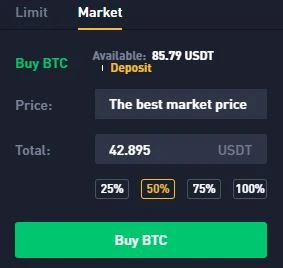
Here, you’ve selected the market order to buy BTC worth 50% of our capital. As soon as we hit the “Buy BTC” button, the order will be filled immediately at the best available market price from the order book.

How to Open a Position
To open a position, we will use a simple market order. This is what our order looks like:

Here, we are using a market order to deploy 100% of our USDT in BTC as quickly as possible. Once we hit the green button, we will effectively long BTC and open a position.
Once your position is live, you can check it in your Trade History that’s found right below the boxes with the order types:

This is where you will find information about your position, which includes whether you’re long or short, your entry price, as well as your position size, and the transaction fee you paid.

How to Close a Position
Closing a position on the spot exchange is different than closing a position on a leveraged platform. You can close your position partially or fully by selling the designated amount of BTC.
example:

In this example, we want to close only 50% of our position, which automatically calculates that it’s 0.00101 BTC. As soon as we hit the sell button, the transaction will take place, and we will see our BTC holdings deducted by this amount.

How to Copy Trade on BitYard?
Copy trading is something more or less designated for people without sufficient experience or time on their hands. Instead of making decisions about what trade to enter and the necessary research associated with taking an informed call of the kind, users can replicate the trades of others.
At the time of writing this guide, there are quite a bit of traders who allow users to copy them, and they’ve achieved various levels of returns. Here’s what the dashboard looks like:
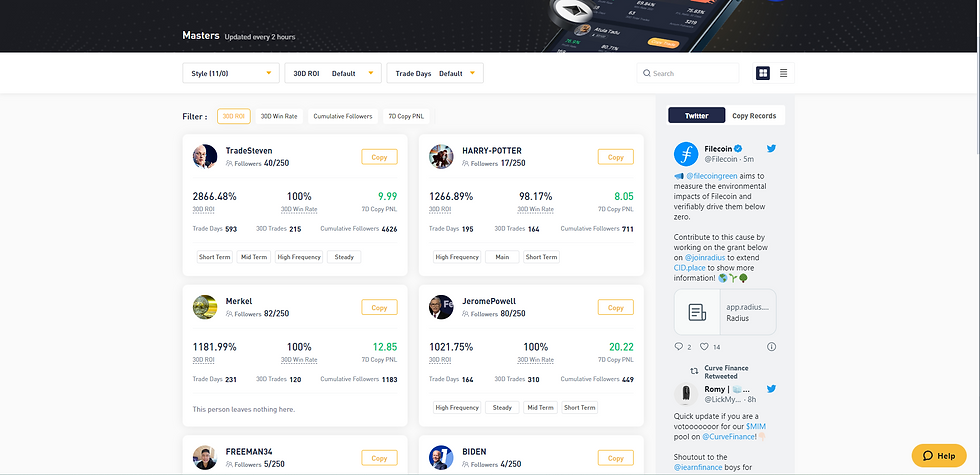
There are plenty of settings that can be adjusted to better define your searches and criteria. You can adjust the style of trading, the profit rate, as well as the trading days. This will pull up different results that are better suited to your own style.
So long as you’ve chosen the trader to copy, you should proceed to click on “Copy Trade.” This is the next pop up:

From here, you can adjust the trades that you will be doing. For example, in the current setup as shown above, if the trader places a position, we will copy it with a maximum of 20 USDT. On the other hand, if the day’s total copy trading amount reaches 12,000 USDT, then trades will no longer be copied. Alternatively, you can also click on “Fixed Ratio” and execute the settings in percentages.

Wrap up - Why ths is KWF's Prefered Exchange
All in all, BitYard seems to have become a fully-fledged cryptocurrency exchange and has taken a significant leap forward in the past few months. It has added spot trading capabilities which are absolutely essential for many users, as well as the ability to copy trade which is also an interesting feature.
Pros:
Variety of trading options
Inverse perpetual contracts denominated in crypto
Attractive affiliate program
FIAT deposits
Use this link to earn rewards, opportunities, and entrance into a new world of cryptocurrency investments...
https://ftx.us/home/#a=KeyWordFinancial
.png)
Tester McTest
Yeah I made a ton of cash with this test review !!!!
2022年10月28日 11:00:37
Tester McTest
.gif)
KeyWord Financial
You can Place your Review Here, Please don't be toxic
2022年9月13日 18:43:57
KeyWord Financial


